(Dark).svg)
What one month of CrowdSec blocked on our servers
A month ago we added CrowdSec to the network security layer running on our own infrastructure. Here is exactly what it caught and why we think every small business should have something like it.
What is CrowdSec?
CrowdSec is a network security engine that works with your firewall to dynamically block malicious traffic.
Your firewall, the gateway or router sitting at the edge of your network, decides what gets in and out using a list of rules written in advance. Those rules are static. Your firewall has no idea that the address probing your website right now attacked four hundred other businesses this morning, so it cannot react to that probe or shut the attack down while it is happening.
CrowdSec plugs that hole. It reads your web server traffic logs in real time, recognizes when an address is behaving like an attacker, and hands that intelligence straight to your firewall, which blocks it. A static rule list becomes something that responds to what is actually happening on your network.
It also works in both directions. Every attacker your servers catch is reported to the wider CrowdSec community, and in return you receive what thousands of other installations have caught. The practical effect is the valuable part: most malicious addresses are blocked at your firewall before they ever send you a single packet, because somebody else met them first.
That is what it does for us. An attacker caught probing a server in another country is already blocked at our door before they reach us. And when one of our own servers catches something new, the block is applied at the firewall, so every other service behind it is protected by that single detection.
The numbers after one month
These figures come from the production engine on September 2, 2026, one month after deployment.
- 23,787 malicious IP addresses automatically blocked at the firewall.
- 204,660 hostile packets automatically dropped at the firewall.
- 3,700+ attacks detected by our web servers.
- 100% of the traffic reaching our web servers inspected.
Those four numbers fall into two pairs: what the firewall stopped, and what our own web servers caught. The next two sections take each in turn.
What the community caught
Of the 23,787 addresses our firewall is blocking, 99.9% came from the CrowdSec community blocklist: addresses that attacked somebody else, somewhere else in the world, and were reported by whoever caught them. Our firewall collects the updated list every two hours.
| What they were caught doing | Addresses |
|---|---|
| HTTP scanning, hunting for weak spots in websites | 22,671 |
| Exploitation attempts against known vulnerabilities | 563 |
| TCP port scanning, mapping which services are exposed | 420 |
| Aggressive crawling | 60 |
Nineteen out of every twenty addresses were caught scanning websites for weak spots. That is what most hostile internet traffic actually is: not a break-in, but somebody rattling door handles looking for one that opens.
Being on a blocklist does not stop anyone from trying. The traffic still arrives, and something has to throw it away. From August 26 to September 2 alone, our firewall discarded 204,660 packets from those addresses, roughly twenty every minute, day and night. None of it reached a web server.
What our own servers caught
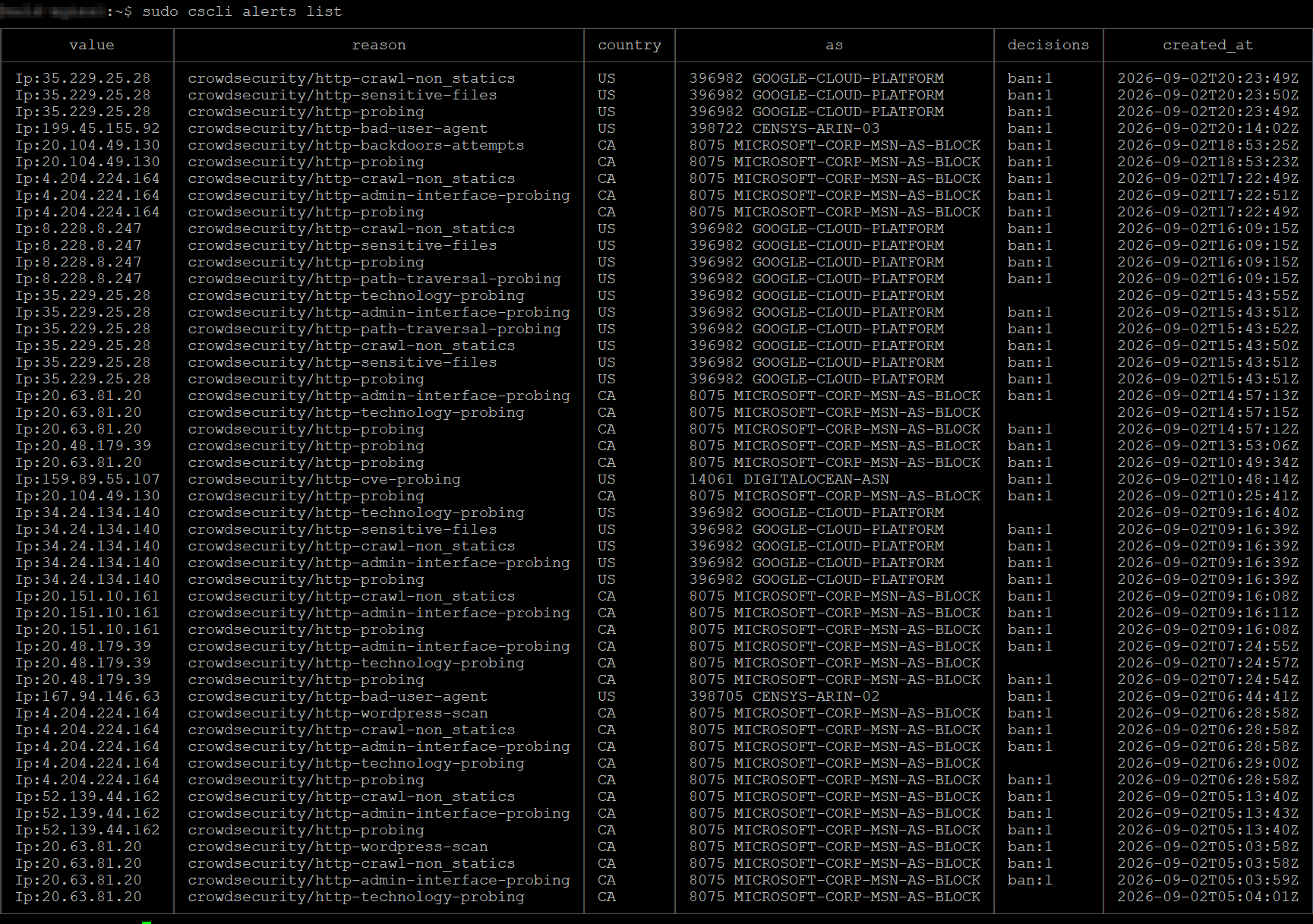
CrowdSec also runs on our own web servers, reading their traffic as it arrives and judging the traffic by how it behaves rather than by whether it originates from an address on a list. It identified 3,700+ attacks against our web servers from IP addresses not yet flagged by the community. In rough order of frequency, this is what they tried:
- Generic HTTP probing, by far the most common: automated requests for paths that do not exist, looking for anything at all that answers.
- Attempts to read sensitive files, specifically configuration files, backups and
.envfiles, which routinely contain database passwords and API keys. - WordPress-specific scanning, aimed at the most widely deployed and most frequently outdated software on the web.
- Probing of admin interfaces, looking for login pages that were left exposed.
- Path traversal, technology fingerprinting, backdoor upload attempts and probes for known CVEs.
Nearly all of the traffic came from cloud-hosted scanners running on Google Cloud, Microsoft, Censys, and DigitalOcean. The traffic matched patterns consistent with automated scans, not direct attacks. This makes sense because most attackers do not pick a target and then scan it. Ordinarily, attackers run automated scans of the entire internet, then select a target once initial vulnerabilities are found.
And there is a lesson to be learned here. It does not matter how small your business is. Attackers target those with identifiable vulnerabilities. If you do not take proper precautions, you will become a victim.
Catching attackers this way only works if your security tools monitor 100% of the traffic hitting your servers. All traffic needs to be inspected for malicious intent.
What this means for your business
Stripped of the technical detail, here is the value a layer like this delivers:
- A smaller attack surface. Tens of thousands of known-bad sources never reach your applications at all, which sharply reduces the chance that an unpatched vulnerability is found before you have patched it.
- Less noise, and less cost. Automated scanners are cut off after a few requests instead of hammering your servers for hours. That means lower CPU usage, smaller log volumes and fewer alerts that turn out to be nothing.
- One detection protects everything. Because enforcement happens at the firewall rather than on an individual server, an address caught probing one system is blocked for every service behind that firewall.
- Evidence when you need it. Every alert and decision is stored with the source address, country, network owner, attack type and timestamp. That is what turns "we think we are secure" into something you can actually show an auditor, an insurer, or a client running a vendor security review.
What this actually demonstrates
CrowdSec is a good tool. But the tool is not the point, and the tool is not what we sell.
Somebody had to notice the gap was there to begin with. Somebody had to work out which tool closed it, wire the detection through to enforcement at the firewall, tune the whitelists so that no customer and no staff member ever got caught in the net, and then watch it for a month to confirm it was doing what it promised.
That is the work, and it is exactly the work we do for our clients. We look at a network, find the places where something is missing, and close them.
CrowdSec is one layer of the layered security stack we build for our clients, sitting in the network security layer alongside the firewall itself. It is not a complete security program on its own, and we would not claim otherwise.
If you have questions about any of this, or you want help implementing security like this in your own business, get in touch. We are happy to talk it through.
Common questions
How many attacks does a small business website actually get?
Many more than most owners expect. Our servers detected 3,700+ attacks, the firewall dropped 204,660 hostile packets, and 23,787 malicious addresses were blocked at any given time. Nearly all of it was automated scanning from cloud-hosted machines rather than a targeted attack, which means the same traffic is reaching every business with an internet connection.
Will intrusion prevention block my customers or my staff by mistake?
It can, if it is configured carelessly, and that is the most common reason businesses avoid it. Configured properly, with whitelists for internal networks, content delivery networks, public DNS and search engine crawlers, false positives are avoidable. Across a full month of operation on our systems, no legitimate user was reported blocked.
Does CrowdSec cost anything?
The software itself is open source, and the Community tier, which includes the shared blocklist, is free. There are no license fees and no additional hardware is required. The real investment is the expertise to deploy, tune and monitor it correctly, so that it blocks attackers without blocking customers.
Is my business too small to be attacked?
No. Nearly all of the activity we recorded came from automated scanners sweeping the entire internet rather than choosing specific targets. Attackers scan first and select afterwards, based on what responds and what looks vulnerable. Business size has no bearing on whether you are scanned, only on whether you are prepared for it.
What is missing from your network?
We find the gaps in small business networks across Sacramento, Citrus Heights and Northern California, and then we close them. If you would like to know what is not currently protecting your business, start with a free security assessment or get in touch.
Contact Veldtech